OpenBB Workspace
Connect Disclosure Alpha as a self-hosted OpenBB Workspace custom backend. One API process powers a single Disclosure Company widget — score card, active flags, and section changes in one view.
Audience: Analysts using OpenBB Workspace with a local or private disclosure-alpha-api deployment.
Before you start: Installation ([api,mcp] extras) and SEC EDGAR Setup for live EDGAR scoring.
Install and run
pip install "disclosure-alpha[api,mcp]"
export SEC_USER_AGENT="YourName your@email.com"
disclosure-alpha-api
# default: http://0.0.0.0:8000
The same process serves OpenBB JSON (/widgets.json, /apps.json), the Company widget (/openbb/company), and the analyst MCP endpoint (/mcp) when [mcp] is installed.
Connect OpenBB Workspace
Sign in to OpenBB Workspace (Chrome recommended; Safari/Brave block HTTP localhost).
Open Apps → Connect backend.
Enter:
Name: Disclosure Alpha
URL:
http://127.0.0.1:8000(not0.0.0.0; match yourPORTif overridden)Validate widgets: No for first connect (Yes works once
demo=1defaults are installed)
Click Test, or skip Test and click Add if Test shows a generic 500.
Watch the API terminal when you click Test — you should see
widgets.jsonandapps.json. If nothing appears, the failure is in the browser/OpenBB UI, not your server.
Prefer Apps → Connect backend (documented OpenBB path). The Connections page uses the same URLs but may behave differently in some Workspace builds.
Set widget param demo to 1 for a fast first Run without SEC fetches. Clear it for live EDGAR scoring.
If Test still shows Status 500
Your API is OK if these work in the browser: /, /widgets.json, /apps.json.
Open DevTools → Network on
pro.openbb.co, click Test, and note the failing request URL (oftenpro.openbb.co/api/..., not127.0.0.1).Use Chrome (Safari blocks HTTP localhost from HTTPS pages).
Try Add without Test.
Last resort: expose via
ngrok http 8000and use the HTTPS URL in Connect backend.
Open My Apps → Disclosure Alpha — one full-page Company widget: overall score, nine headline components, active flags (grouped by section), and section changes vs the prior filing.
10-Q: set widget param Quarter to Q1, Q2, or Q3 (required). Leave blank for 10-K.
Click Run — the first live Run can take several seconds while EDGAR fetches and parses the filing. Re-running the same ticker is faster.
What you should see
After Run on a live filing, the Company widget shows overall score, headline components, active flags, and section changes:
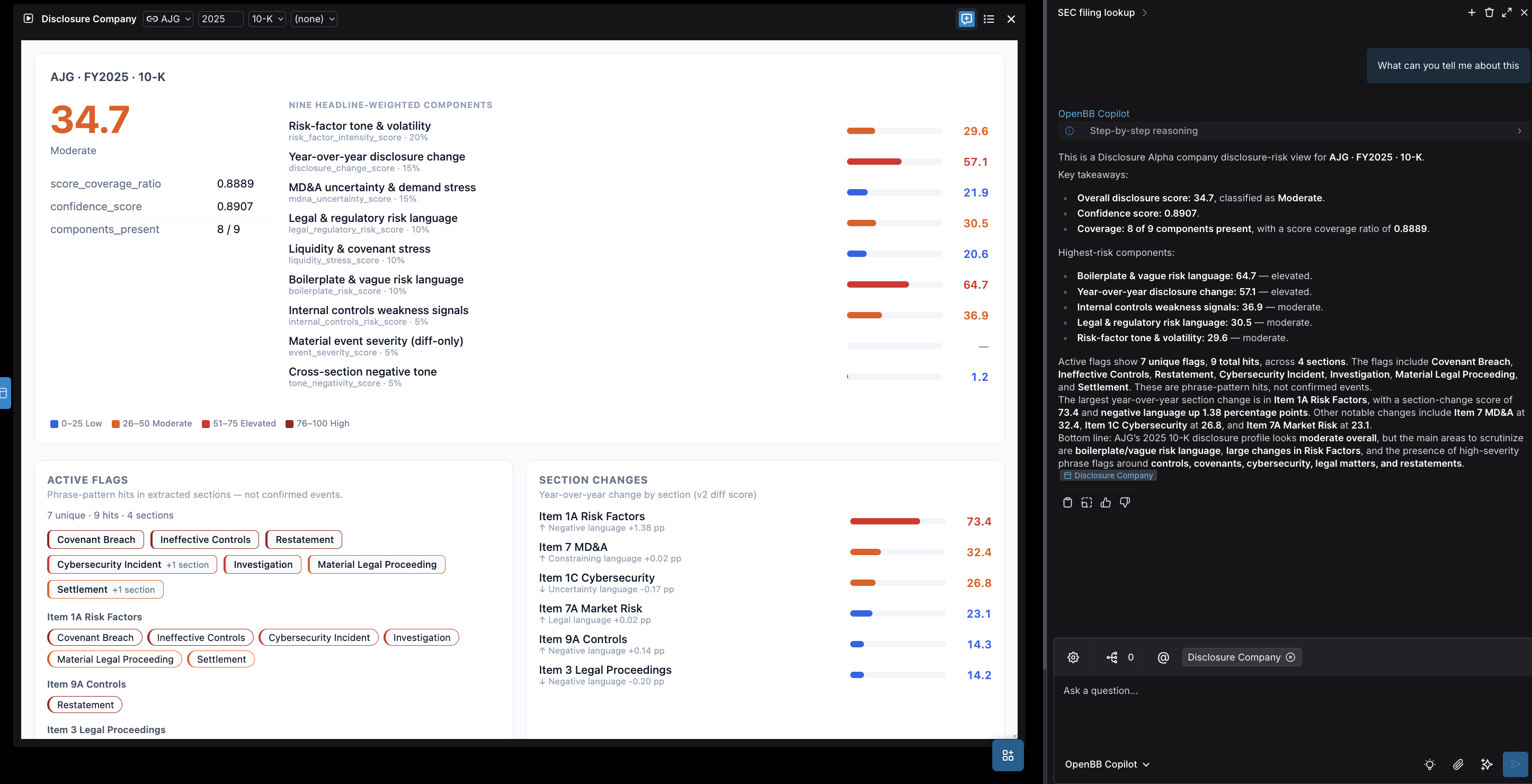
OpenBB Copilot (right sidebar) can summarize the visible widget; that is an OpenBB Workspace feature, not part of the Disclosure Alpha backend.
Copilot prompts and MCP
The Disclosure Alpha app ships curated Copilot prompts (with @[id:disclosure_company] widget tags) and an in-app Disclosure Alpha Analyst MCP server at /mcp on the same backend.
Open My Apps → Disclosure Alpha.
Use the suggested prompts in Copilot, or ask your own questions about the widget data.
When prompted, connect Disclosure Alpha Analyst MCP from the app page — tools include
score_company_filing_toolandlist_company_filings_tool.
After upgrading the package, right-click your connected backend in Workspace and choose Refresh backend so OpenBB reloads widgets.json and apps.json.
Widget parameters
Param |
Default |
Notes |
|---|---|---|
|
|
Company ticker |
|
|
Fiscal year (1994–2100) |
|
|
|
|
— |
Required for 10-Q: |
|
— |
Hidden param; set to |
CORS
Workspace runs in the browser at https://pro.openbb.co and fetches your local API. Chrome/Chromium require Private Network Access preflight — Disclosure Alpha adds Access-Control-Allow-Private-Network: true automatically.
Allowed origins (override with OPENBB_CORS_ORIGINS):
https://pro.openbb.cohttps://pro.openbb.devhttp://localhost:3000
If DevTools shows Provisional headers are shown on 127.0.0.1 requests, Chrome blocked the call before it reached your server (not a CORS config bug in Disclosure Alpha).
Chrome Local Network Access (Chrome 142+)
https://pro.openbb.co → http://127.0.0.1 requires a browser permission Chrome calls Local Network Access (LNA). CORS headers on your API are necessary but not sufficient.
Click Test in OpenBB and watch for a Chrome prompt: “pro.openbb.co wants to look for and connect to devices on your local network” → click Allow.
If you never see a prompt: open
chrome://settings/content/localNetworkAccessand allowhttps://pro.openbb.co.Confirm the API terminal logs
GET /widgets.jsonwhen you click Test. No log line = Chrome blocked it; 200 = request reached your server.Remove the trailing slash in the URL (
http://127.0.0.1:8000, not...8000/).
Workaround if Chrome never prompts
Expose the API over HTTPS with a tunnel, then use that URL in Connect backend:
ngrok http 8000
# use the https://....ngrok-free.app URL in OpenBB
Or skip Test and click Add directly (may still need the LNA allow prompt on first widget load).
HTTPS (Safari / Brave)
Local HTTP backends may be blocked. Use a TLS reverse proxy or tunnel (e.g. ngrok) and point Workspace at the HTTPS URL.
Scope and claims
Scores summarize language and change signals in SEC filings. They are research tools, not investment advice or trading signals. See What This Does and Does Not Claim.
Related
Quickstart: OpenBB Workspace — five-minute setup path
Production Notes — self-hosted deployment (multi-worker, CORS)